Completing Onboarding
The first time you enter an organisation, you may be asked to complete a short onboarding questionnaire. Your care team uses your answers to set you up and to recommend the most relevant content for you.
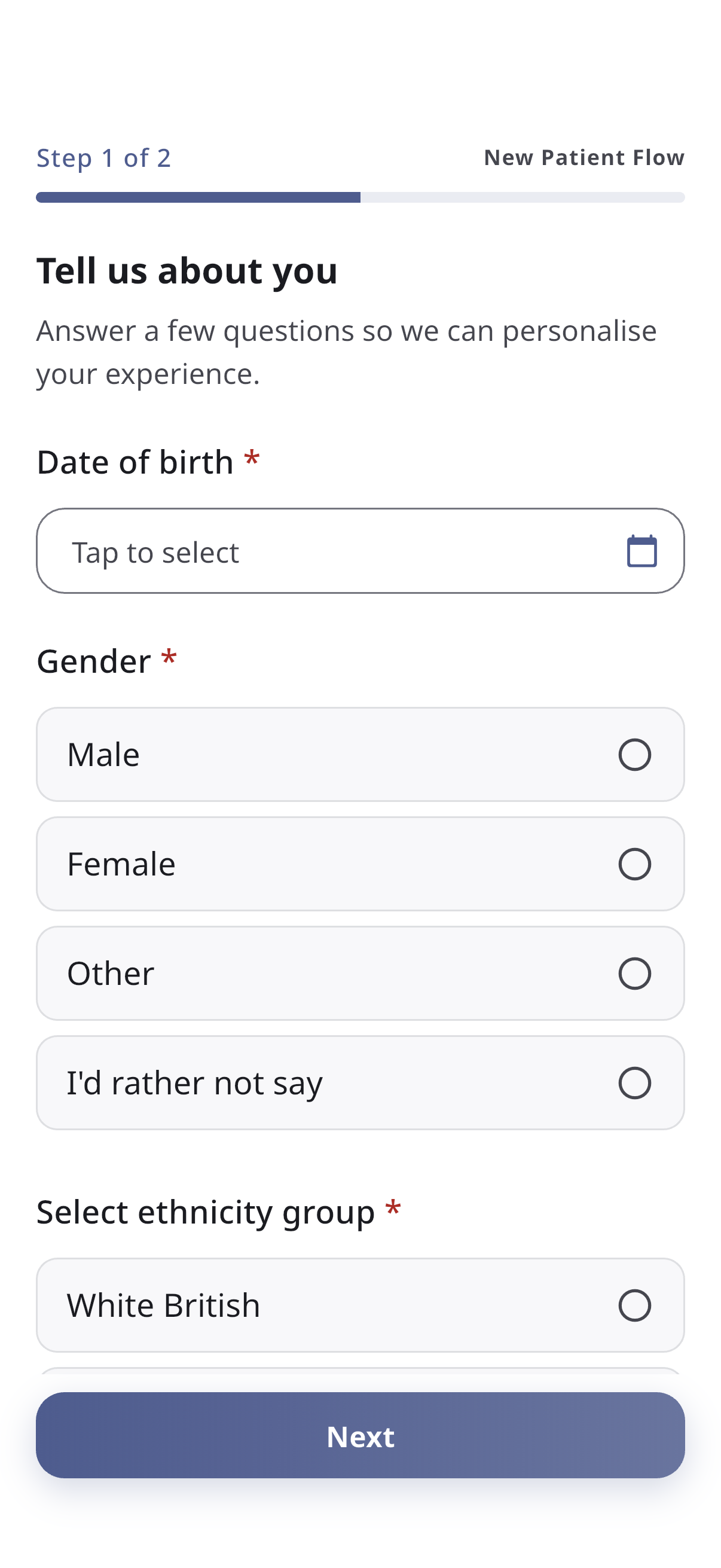
How it works
- The questionnaire is split across one or more pages, with a progress indicator at the top.
- On each page, read any instructions and fill in the fields. These might include:
- Text boxes
- Dropdowns to pick an option
- Checkboxes to choose one or more options
- Date pickers
- File uploads
- Required questions are marked with an asterisk (*) and must be answered before you can continue.
- Tap Next to move on, or Back to return to a previous page.
- On the last page, tap Finish to submit your answers.
After you finish, you’re taken to the Home screen and can use the rest of the app.
You won’t be able to skip onboarding while it’s required — but it’s usually short. If a question doesn’t apply to you, your care team’s options will normally include a suitable choice.
Changing your answers later
Onboarding is completed once. If your details change, contact your care team — they can update your record (and may ask you to complete onboarding again). Your submitted answers also appear in your Health Passport.